
Creating a User Defined HTML Report
As the SQLDeveloper 1.5.3 version has been released there have been some bug fixes to the User Defined Reports area.
I decided to create a new version of my old Perl v$session_longops monitor that I wrote about here.
This new improved version runs as a Used Defined Report inside of SQL Developer. Here is how to get it running:
Create a new Report
In SQLDeveloper,
• Select View->Reports
• Right click on the User Defined Reports folder and select Add Report.
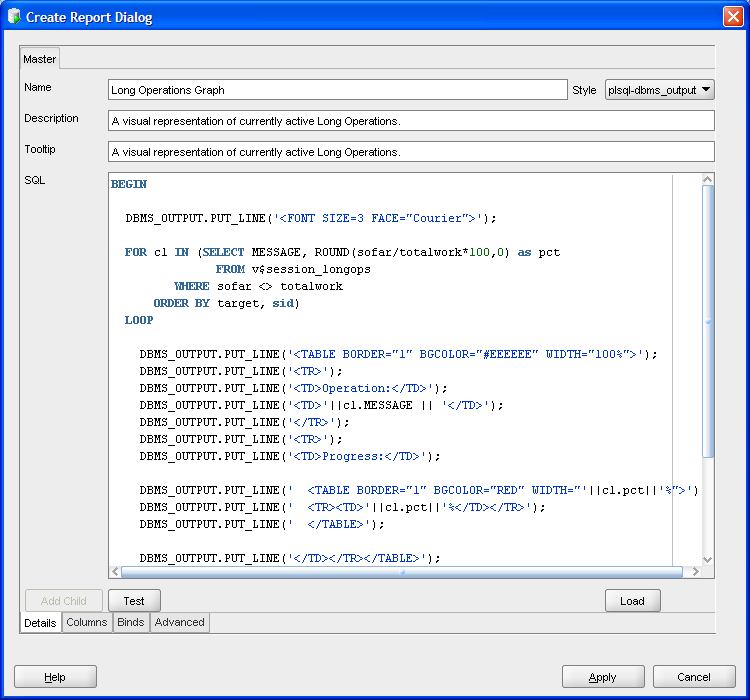
• Enter Name: Long Operations Graph
• Select Style plsql-dbms_output from the dropdown
• Enter Description: A visual representation of currently active Long Operations.
• Enter the SQL for the report. Source code is available here: SQLD-LongOps-HTML.sql
Here is an example of how the screen should look when you are done (click to enlarge):
• Select Apply button.
Run the User Defined Report
• Select View->Reports
• Expand the User Defined Reports folder.
• Select the Long Operations user defined report.
• Select the Data Source for the report.
• Select "Run Reports" icon or select Refresh Rate.
• Report will execute and show any long operations.
Here is an example of the report running with 1 long operation (click to enlarge):
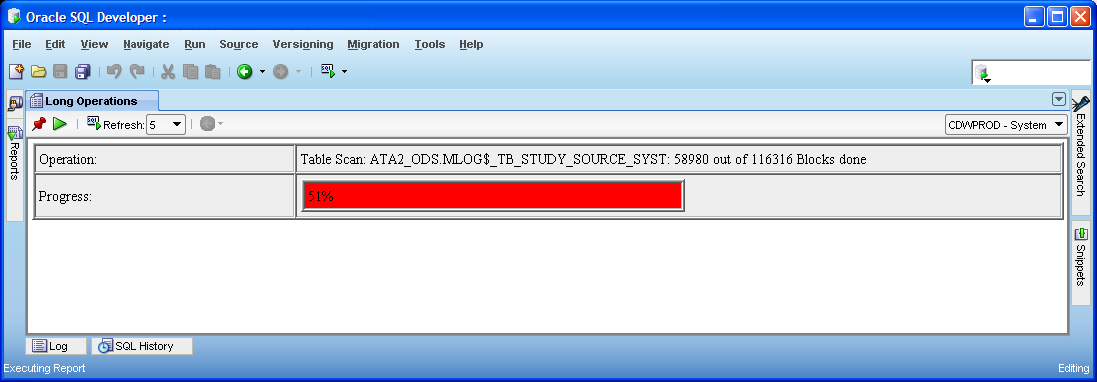
If you have more than 1 long operation running at the same time they will stack on top of each other and a scrollbar will appear at the right side of the results window. If no long operations are running then the message No Long Operations Active will be displayed.